CTERA InsightAI is a Software as a service (SaaS) tool, hosted by CTERA, that provides the best way to make sure you remain up and running. CTERA InsightAI is deeply integrated with CTERA’s Intelligent Data Platform providing real-time monitoring of CTERA Portal and CTERA Edge Filers, from one central Web-based interface. By delivering end-to-end observability across edge locations, organizations can make data-driven decisions that enhance security, optimize storage, and reduce costs. By knowing exactly how the CTERA platform is behaving at any given moment means that you can identify any potential problems before they become serious and resolve them.
CTERA InsightAI can also be installed in a customer VPC in either AWS or Azure.
Overview
As unstructured data continues to grow across distributed environments, CTERA InsightAI empowers IT teams to monitor and manage data activities across locations with greater accuracy and efficiency:
- Monitor Activity: Real-time dashboard visualizations of file activity across edge filers, with granular detail and performance metrics. CTERA InsightAI enables organizations to identify trends and make informed IT operations and security decisions.
- Discover Usage: A comprehensive view into storage consumption, file types, access distribution, and ownership. CTERA InsightAI helps to pinpoint opportunities for storage optimization, better predict capacity requirements, and maintain compliance.
- Investigate Security Incidents: Long-term audit logging, enabling detailed filtering and activity forensics. It enables in-depth investigations of suspicious behaviors, helping enforce robust security measures across the organization.
- Curate Datasets for AI: Identify and refine high-quality datasets from vast volumes of unstructured data to advance large language model (LLM) and machine learning (ML) initiatives.
Optimized for performance and scale, CTERA InsightAI delivers powerful insights with minimal impact on system performance. Pre-built dashboards and a powerful big-data pipeline provide clear, actionable visualizations that allow IT teams to quickly respond to emerging data trends.
To ensure the safety of client data, CTERA Networks offers military-grade security solutions at every level, including infrastructure security, network security, and application security, to counter threats both internal and external. For more details, see Secure Architecture.
CTERA Edge filer audit logs are securely uploaded to CTERA Insight for analysis and visualization.
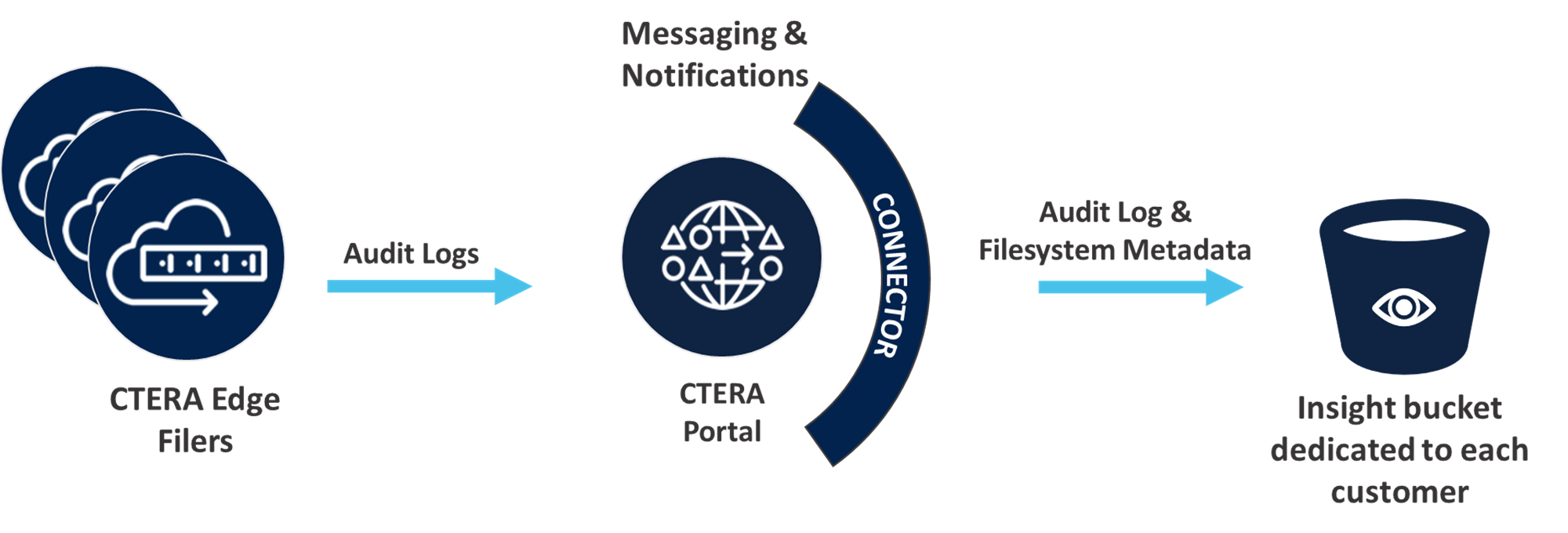
The CTERA InsightAI API web service serves as the central hub for communication between the CTERA Portal and the Insight infrastructure. It authenticates incoming requests using secure tokens generated during the onboarding process, ensuring that each tenant’s data and operations remain isolated. The API also facilitates the issuance of short-term AWS Security Token Service (STS) credentials, which are used by the portal to upload files containing metadata and audit logs into dedicated storage.
Ask Insight
CTERA InsightAI does not just present information about the status of your environment but provides an AI-powered assistive search and chat feature, Ask Insight, designed to provide instant, contextual answers to questions about the data, in plain English. Ask Insight translates these questions into secure database queries, returning the result as text.
Ask Insight is available from every CTERA InsightAI screen.
Key Features of Ask Insight
Natural Language Processing: Translates text or voice questions into database queries using the Claude Opus 4.6 LLM engine
Contextual Awareness: Interprets relative timeframes, such as last week, file sizes, and specific actions, such as deletions.
Interactive Outputs: Provides text-based answers and allows users to generate automated reports directly from the chat.
Security & Privacy: Ask Insight executes all queries within the user's specific security context to ensure they only see authorized data.
Citations: Responses include citations to specific source articles so users can verify information.
Example Usage
The following are just some of the uses available from Ask Insight:
- Identifying the most active users in specific shares
- Locating files exceeding specific size thresholds. For example files excedding 1GB.
- Summarizing storage consumption for specific office locations.
On-Premise and Private Cloud Support
Customers that want real-time monitoring of the CTERA Portal and CTERA Edge Filers connected to the portal in their own virtual private cloud in AWS, should contact CTERA support.
Customers that want on-premise real-time monitoring of the CTERA Portal and CTERA Edge Filers connected to the portal can connect the portal to Splunk. For details about how to implement the connection, contact CTERA Support.
Setting Up CTERA InsightAI
The portal global administrator configures CTERA InsightAI, as described in Setting Up Access to CTERA Insight.
Requirements
CTERA InsightAI requires the CTERA Portal 8.3.3000.40 and higher and the CTERA Messaging service enabled.
CTERA InsightAI uses audit logs from the edge filers. Audit logging must be enabled on the edge filers. Edge filer versions 7.9.x, 7.11.x, 7.12.5400.18 and higher, and 7.13.6000.6 and higher are supported.
Endpoint and Port Requirements
The following endpoints must be enabled from the portal:
| Endpoint | Port | Protocol | Direction |
|---|---|---|---|
| *.ctera.ai | 443 | TCP | Outbound |
| *.s3.amazonaws.com | 443 | TCP | Outbound |
After enabling CTERA InsightAI, you need to wait for about an hour until all the activity analytics (audit logs) dashboards are populated. and around 24 hours until all the file system dashboards are populated.